Docs / Aim Trainer
How to Link Your Discord Account
Link your Discord account to your ingame username to keep your stats connected and access features on the NotGR4VE website, Discord and servers.
Last edited 22 Aug 2026
Connect through Discord
Join the Discord server and head to the #🔗︱connect-here channel.
Type /connectaccount and choose whether you play on PlayStation or Xbox. You will then be asked to enter your exact ingame username. Make sure you enter the same username you use on the server.
The Discord method automatically verifies your account, so once the connection is complete, you are ready to use the features.

Connect through the website
At the top right of the website, select Sign In and choose Sign in with Discord.

After signing in, the website will ask for your PlayStation or Xbox username. Enter the exact username you use in game and select Link Account.
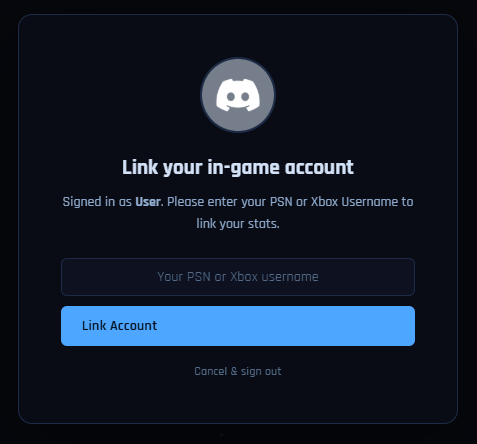
This connects your Discord account to your in-game account, but you will still need to verify that you own the username. This helps prevent anyone from being able to enter your username and grief you by joining gamemodes or changing your settings. You can verify your account in two ways:
- Verify in game: If you are currently on the server, the website can give you two randomly selected quickchats. Send them in the exact order shown. You need to be online for this to work.
- Connect on Discord: You can run /connectaccount in the NotGR4VE Discord instead. You do not need to be in the game for this option.
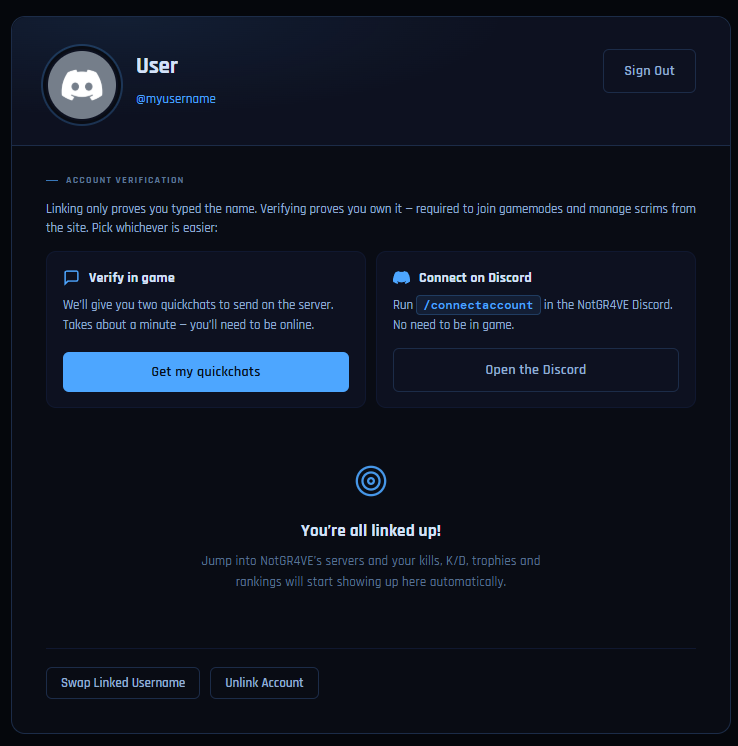
Once your account has been linked and verified, your stats will appear on your profile and you can use the available website, Discord and server features.